
New Accounts / Free Trials:
If you signed up using our intake form or a free trial request, a Custom Channels team member will contact you within 15 minutes after setting up your billing profile and assigning your channels.
How to View Billing Information
Step 1: Navigate to Billing
-
From the Settings tab, click on Billing.
Step 2: Click 'Update Billing Info
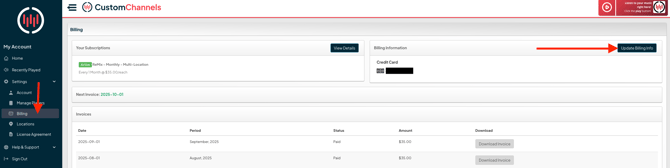
Note: If you are adding an ACH account, you may not see it reflected immediately on your account. Our payment courier will be sending a small micro-deposit to your account to verify your account details. When you receive this deposit, please confirm the 6-digit code in the statement descriptor of this deposit (it's a 6-letter code beginning with SM--).
Please reach out to accounting@customchannels.net if you have any additional questions on this and we'll be happy to help.
Need Help Sooner?
If it's been more than 15 minutes or you need immediate help:
Email customerservice@customchannels.net and we'll assist you right away.